
Silk Mobile
Table of Contents (Homepage)
- Overview
- Setting Up
- Getting Started
- How To
- Connecting Devices And Emulators
- Preparing Applications For Testing
- Managing Applications
- Recording Tests
- Working With Test Commands
- Adding Commands To Your Scripts
- Object Commands
- Click
- ClickCoordinate
- ClickIn
- ClickOffset
- Drag
- ElementGetProperty
- ElementGetTableRowsCount
- ElementListPick
- ElementListSelect
- ElementListVisible
- ElementScrollToTableRow
- ElementSendText
- ElementSetProperty
- ElementSwipe
- ElementSwipeWhileNotFound
- GetAllValues
- GetElementCount
- GetElementCountIn
- GetTextIn
- IsElementBlank
- IsElementFound
- IsFoundIn
- LongClick
- RunNativeAPICall
- SendWhileNotFound
- VerifyElementFound
- VerifyElementNotFound
- VerifyIn
- WaitForElement
- WaitForElementToVanish
- GetCoordinateColor
- DragDrop
- Application Commands
- Device Commands
- Web (Hybrid) Specific Commands
- Utilities Commands
- Monitoring Commands
- Configuration Commands
- ExtractLanguageFiles
- SetDefaultClickDownTime
- SetDefaultTimeOut
- SetDefaultWebView
- SetDragStartDelay
- SetInKeyDelay
- SetKeyToKeyDelay
- SetLanguage
- SetLanguagePropertiesFile
- SetShowImageInReport
- SetShowPassImageInReport
- SetShowReport
- SetSpeed
- SetThrowExceptionOnFail
- SetWebAutoScroll
- StartStepsGroup
- StopStepsGroup
- TextFilter
- Miscellaneous Commands
- Controlling Element Identification Rules
- Editing Test Objects
- Executing Test Scripts
- Report Of Executed Test
- Working From Code Environment
- Continuous Integration
- Layout Verification Tests
- Use Device Vitals Monitors
- Troubleshooting
- Terminology
Connecting A Windows Phone Emulator
Step 1: Prerequisites - For running a Windows Phone emulator, Windows 8.1 Professional edition operating system is required
Step 2: I nstall the WindowsPhone emulator on your PC from the WindowsPhoneDeveloper Center. http://dev.windowsphone.com/en-us/downloadsdk.
Step 3: F ollow the following instructions to enable Hyper-V functionality in Windows 8.1
Step 4: S tart an emulator.
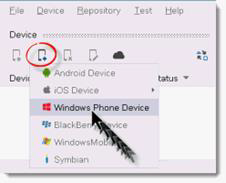
Step 5: Go to the "Device" tab in Silk Mobile , click the Add Device icon and select "Window Phone device” from the drop-down list:
Step 6: Choose the desired emulator.
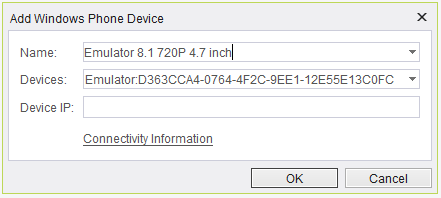
The IP-address of the emulator automatically discovered if you are running Silk Mobile with administrative privileges (consider running <install_dir>\studioAdmin.exe ).
Step 7: The added emulator is now connected to Silk Mobile and ready for testing. You can now start creating a new test.
Note: You may work with at most one connected emulator at any given time.